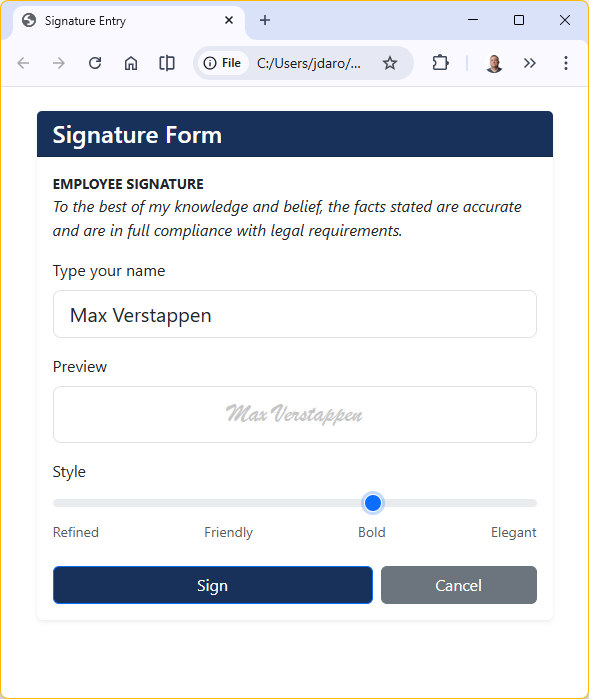
System Fonts are Not Universal
For this project, we are building a signature form that uses CSS font-family declarations referencing fonts by name; Lucida Handwriting, Bradley Hand, Brush Script MT, and Segoe Script. These are all proprietary system fonts. When the browser can’t find the font locally, it falls back to a generic cursive, which looks inconsistent and unprofessional.
For example, Windows machines have Segoe Script but not Bradley Hand. Macs have Bradley Hand but not Segoe Script. Linux has neither. The result varies by machine.
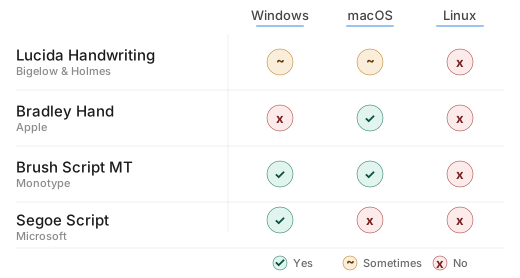
Because system fonts cannot be relied upon across a mixed environment, any form intended for broad use needs an alternative strategy for delivering those fonts to the browser.
There are two practical approaches:
- Loading fonts at runtime from a web CDN
- Embedding the font data directly inside the HTML file itself
Both options have trade-offs around dependency, licensing, and how closely the fonts match the originals, all covered in the sections below.
Two Options
When a browser renders an HTML form, it looks for fonts locally on the machine first. If the font isn’t installed, it falls back to a generic alternative. To guarantee a consistent result across machines, the font needs to be delivered to the browser through one of two methods: pulling it from an external source at load time, or bundling it directly inside the file.
Option 1 – Google Fonts CDN
The simplest approach is to link to Google Fonts, a free public library of over 1,500 web-licensed typefaces hosted on Google’s CDN. You add a single <link> tag to the <head> of your HTML, and the browser fetches the font automatically when the page loads. No files to manage, no licensing concerns, and it works on any machine with internet access. The tradeoffs are that this solution requires a live connection, and Google Fonts does not carry the original proprietary fonts that the customer selected, so you’ll be choosing the closest available substitutes.
Option 2 – Embedded base64 Fonts
The more self-contained approach is to encode the font files as base64 and embed them directly inside the HTML using @font-face declarations. Because the font data lives inside the file itself, there’s no dependency on the network or on fonts being installed locally — the file works identically on any machine, online or off. The tradeoff is that embedding font bytes is technically redistribution, which some font licenses restrict, so it requires a closer look at the EULA for each font before proceeding.
For this implementation we evaluated the CDN approach but ultimately moved forward with Option 2, embedded base64 fonts. Our form runs in a controlled internal environment where the original fonts are available on managed machines, and embedding them ensures the form renders identically for every user without any external dependency. The next section covers how we did it.
Implementing Option 2
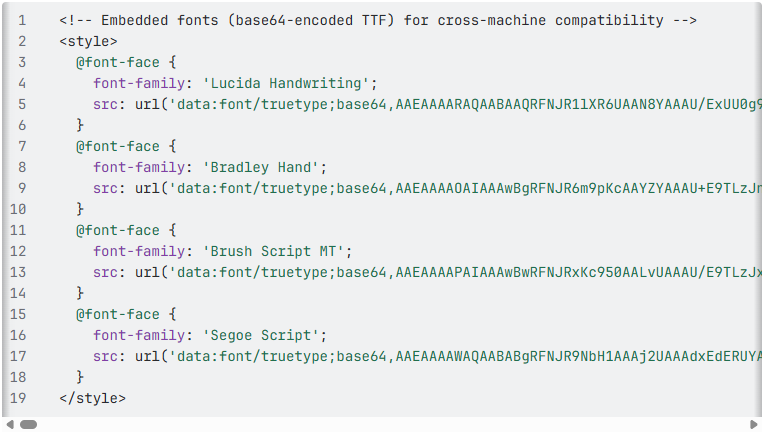
Embedding fonts as base64 means the font data is encoded as a text string and written directly into the HTML file inside an @font-face declaration. When the browser loads the page, it reads the font out of the file itself rather than fetching it from anywhere. The result is a completely self-contained file; no network, no installation, no fallback risk.
Licensing considerations
All four fonts in this form are proprietary, distributed as part of commercial operating systems under vendor EULAs. Those agreements permit the fonts to be used on a licensed machine, but embedding them into a redistributable file is technically a different act, as it extracts the font bytes into a new artifact. The relevant owners are Bigelow & Holmes (Lucida Handwriting), Apple (Bradley Hand), Monotype (Brush Script MT), and Microsoft (Segoe Script).
For this implementation, the form is internal-only, running on customer-managed machines that are already licensed for these fonts through their respective OS installations. The practical risk is low. If your use case differs; external users, public distribution, or a shared artifact leaving the managed environment, a review with your legal or IT compliance team is the right call before proceeding.
How to Embed
You will need access to a machine that already has the fonts installed. On Windows, the font files live in C:\Windows\Fonts\. The four files you need are LHANDW.TTF, BRADHITC.TTF, BRUSHSCI.TTF, and SEGOEPR.TTF.
From there the process is four steps.
- Copy the font files to a working directory.
- base64-encode each file. You have options for this, I chose to have my LLM do this, but there are free convertors on the web, and PowerShell commands on Windows to help. On Windows PowerShell this is
[Convert]::ToBase64String([IO.File]::ReadAllBytes("FONT.TTF")), on Mac or Linux it isbase64 -w 0 FONT.TTF. - Paste each encoded string into an
@font-faceblock in the<head>of your HTML using adata:font/truetype;base64,URI. - Verify that the
fonts[]array in the page’s JavaScript still references the correct font names, since that array controls what gets written to the hidden fields on form submission.
The encoded strings are long — each font adds between 70KB and 220KB to the file — but this is negligible for an internal form and requires no infrastructure to support.
The cool part here, is that our markup barely changes. We add the fonts, and the rest of the markup remains untouched.
CDN vs. Base64 Decision Guide
When choosing how to deliver web fonts in an internal HTML form, the right approach depends on your deployment environment, connectivity requirements, and font licensing situation. The table below summarizes the tradeoffs, followed by a rule-of-thumb guide for future projects.
| Factor | Google Fonts CDN | Base64 Embedding |
|---|---|---|
| Font availability | Substitute fonts only (e.g., Dancing Script for Brush Script MT) | Exact proprietary fonts |
| Internet required | Yes, fails offline or behind restrictive proxies | No, fully self-contained |
| File size | Minimal HTML; fonts load externally | Larger HTML file (~200–400 KB per font) |
| Font licensing | Google Fonts are open license | System fonts: internal use low-risk; redistribution is not |
| Maintenance | CDN-managed; always current | Static snapshot; manual update if font changes |
| Best for | Public-facing or internet-connected tools | Internal, air-gapped, or controlled environments |
Use Google Fonts CDN when:
- The form will be hosted publicly or accessed by users outside the customer’s infrastructure
- Exact font matching is not required and an open-license substitute is acceptable
- You want to minimize HTML payload size
Use base64 embedding when:
- The form must work offline or in restricted network environments
- Exact font fidelity is required (e.g., specific handwriting styles for signature appearance)
- The fonts are already licensed on all target machines and distribution stays internal
- You want a single portable file with no external dependencies
For this project, all four conditions in the base64 column applied, making embedding the clear choice.